Landing Pages vs. Homepages: Key Differences and When to Use Each
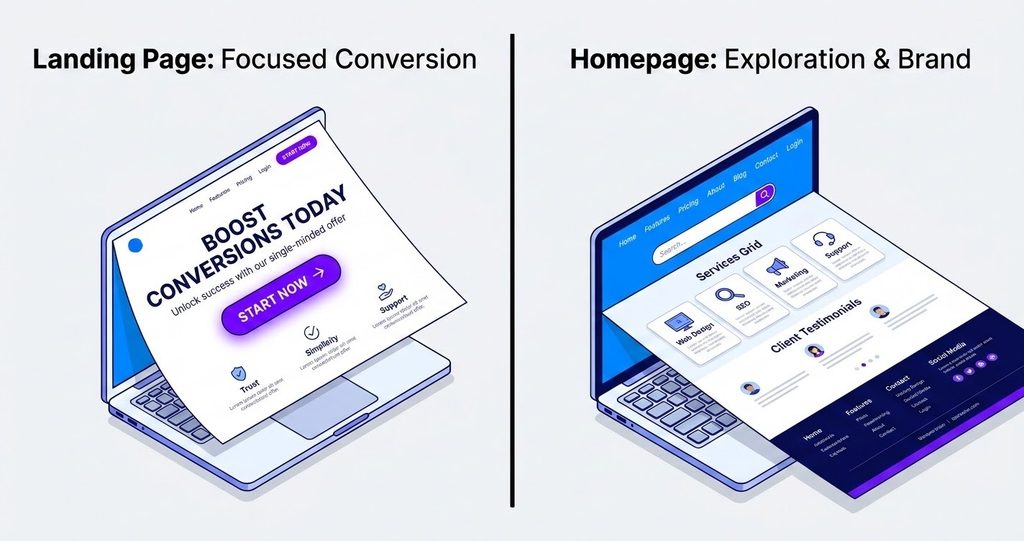
Your homepage and your landing pages do different jobs. Treat them the same and you’ll probably pay for it in wasted ad spend, missed leads, and visitors who leave before they ever contact you.
The landing page vs. homepage decision comes down to one question: what do you want this visitor to do right now? A homepage welcomes people and helps them find their way around. A landing page asks a specific visitor to take one specific action.
This guide is for business owners and marketing decision-makers who want a website that can win you customers. They just get there in very different ways.
What Is a Landing Page?
A landing page is a standalone web page built around one goal. Visitors usually “land” on it after clicking an ad, an email link, a social media post, or a search result.
That goal is called a conversion. It’s the action you want the visitor to take, such as:
- Booking a consultation
- Requesting a quote
- Downloading a guide
- Signing up for a webinar
- Buying a specific product
Good landing pages cut out distractions. They often have little or no navigation menu, one main message, and one clear call to action (CTA). Everything on the page, from the headline to the testimonials, supports that single action.
What Is a Homepage?
A homepage is the main entry point to your website. It’s usually what people see when they type your business name into Google or enter your domain directly.
A homepage has to serve many visitors at once. A first-time visitor wants to know what you do. A returning client wants your phone number. A job seeker wants your careers page. So a homepage typically includes:
- A clear statement of who you are and what you offer
Navigation to your services, about page, blog, and contact detailsbrings in leads and sales. That includes local businesses in Burlington, Ontario, that are weighing their web design options. You’ll learn:
- How landing pages and homepages differ in purpose, structure, and audience
- When to use each one, and when you need both
- What makes each page convert
- How each page type affects SEO
- What design costs and what to ask before hiring via our Website Designing Services
What Is a Landing Page and What Is a Homepage?
Before you compare the two, it helps to define each one clearly. Both are web pages, and both
- Trust signals like reviews, awards, or client logos
- Several paths forward, depending on what each visitor needs
Think of your homepage as a storefront window and lobby combined. It introduces your brand and points people where they need to go.
Is a Landing Page the Same as a Website?
No. A website is a collection of connected pages under one domain. That usually means a homepage, service pages, an about page, a blog, and a contact page. A landing page is a single page, and it may or may not sit inside a larger website.
Many businesses host landing pages on their main domain, such as yourbusiness.ca/free-quote. Others build them on separate platforms or subdomains for specific campaigns. Either way, a landing page has a narrower job than a full website. It doesn’t try to tell your whole story. It just tries to win one action.
Landing Pages vs. Homepages: What Are the Key Differences?
The differences go beyond layout. They affect how you write, design, measure, and promote each page.
Purpose and Conversion Goals
The biggest difference is focus.
A homepage has broad goals. It needs to build awareness, establish credibility, and guide visitors deeper into your site. Success might mean someone clicks through to a service page, reads your about page, or eventually fills out a contact form.
A landing page has one goal. If it’s built to collect quote requests, every element pushes toward that form. Success is simple to define. Either the visitor converted or they didn’t.
This is why landing pages often convert better for campaigns. When you remove competing options, visitors don’t have to decide where to go next. The decision is made for them.
Navigation, Content, and Page Structure
Homepages use full navigation menus, footers packed with links, and content that covers your whole business. Their structure is wide. It shows a little of everything.
Landing pages use a narrow, deep structure. They usually:
- Remove or minimize the main navigation menu
- Focus content on one offer, service, or problem
- Follow a logical, persuasive flow from headline to CTA
- Repeat the CTA at key points down the page
- Answer the objections that might stop someone from converting
A homepage says, “Here’s everything we offer.” A landing page says, “Here’s exactly why you should take this one step.”
Target Audience and User Journey
Homepages serve a mixed audience at different stages. Some visitors are just learning your name. Others are ready to buy. Your homepage has to work for all of them.
Landing pages serve a defined audience at a defined moment. If you run a Google Ads campaign for “emergency plumber Burlington,” the landing page speaks only to people with an urgent plumbing problem in your area. You know their need, their location, and roughly what they searched. That lets you write with far more precision.
This connection between the traffic source and the page content is called message match. When the ad promises a free estimate and the landing page headline repeats that promise, visitors feel confident they’re in the right place.
Calls to Action and Conversion Measurement
Homepages usually carry several CTAs, such as “View Services,” “Book a Call,” “Read Our Work,” or “Contact Us.” That makes sense for a mixed audience, but it also makes performance harder to measure. If conversions drop, which path caused it?
Landing pages usually have one primary CTA, sometimes repeated in a few places. That makes measurement clean. You can track exactly how many visitors arrived, how many converted, and how much each conversion cost. For paid campaigns, that clarity is essential for calculating return on ad spend.
Landing Page vs. Homepage Comparison Table
| Factor | Landing Page | Homepage |
| Primary purpose | Drive one specific action | Introduce the brand and guide visitors |
| Number of goals | One | Many |
| Navigation | Minimal or none | Full menu and footer links |
| Audience | Specific segment from a defined source | Broad, mixed audience |
| Traffic sources | Ads, email, social campaigns, targeted search | Direct, branded search, referrals, organic |
| Calls to action | One primary CTA, often repeated | Multiple CTAs for different paths |
| Content scope | Narrow and deep | Broad overview |
| Lifespan | Often tied to a campaign | Permanent |
| Success metric | Conversion rate, cost per lead | Engagement, click-through to key pages, overall leads |
| SEO role | Targets specific, often transactional keywords | Targets brand and broad category terms |
When Should You Use a Landing Page Instead of a Homepage?
Use a landing page whenever you’re paying for traffic, targeting a specific audience, or promoting one offer. Use your homepage when visitors need to explore.
Use a Landing Page for Paid Advertising Campaigns
Sending paid traffic to your homepage is one of the most common and costly mistakes in digital marketing. You’re paying for every click, so every visitor should land somewhere built to convert them.
Picture a Burlington renovation company running ads for basement finishing. If the ad sends people to the homepage, they’ll see kitchens, bathrooms, decks, and a company history. They have to hunt for basement information, and many won’t bother.
Now send that same click to a dedicated basement renovation landing page. Visitors see a headline about basement finishing, photos of finished basements, local reviews, a price range, and a form to book a free in-home estimate. The path is obvious, and more visitors take it.
Landing pages work well for:
- Google Ads and Microsoft Ads search campaigns
- Meta, LinkedIn, and other social ad campaigns
- Display and retargeting ads
- Campaigns for specific services, locations, or seasonal offers
Use Landing Pages for Email Marketing and Social Media Campaigns
Email subscribers and social followers already know you. When you send them a promotion, they don’t need your full brand story. They need the details of this offer and an easy way to act.
A dedicated landing page lets you:
- Match the page to the exact offer in your email or post
- Track how each campaign performs
- Test different headlines, images, or offers
- Keep limited-time promotions off your main navigation
For example, a Burlington fitness studio promoting a January membership deal could link its email and Instagram posts to one landing page with the offer, class schedule, and a sign-up form.
Use a Homepage for Brand Discovery and General Website Traffic
Your homepage is the right destination when visitors haven’t decided what they want yet. That includes:
- People who search your business name
- Visitors who hear about you through word of mouth
- Links from directories, local news, or partner sites
- Your Google Business Profile website link, in many cases
- Anyone who types your URL directly
These visitors need context and choices. A strong homepage gives them a clear summary of what you do, proof that you do it well, and easy routes to the information they want.
When Should a Business Use Both Page Types?
Most growing businesses need both. The homepage builds your brand and supports organic discovery. Landing pages turn targeted campaigns into leads and sales.
You should use both if you:
- Run paid ads or regular email campaigns
- Offer several distinct services to different audiences
- Serve multiple locations, such as Burlington, Oakville, Hamilton, and Milton
- Want to test offers without redesigning your main site
The two page types also support each other. Someone may find you through a landing page, leave, then search your name later and land on your homepage. A consistent brand across both builds trust at every touchpoint.
Which Page Is Better for Conversions, Leads, and Sales?
For a single, targeted action, landing pages almost always win. Homepages still matter for conversions, but they work differently and should be judged differently.
How Does a Landing Page Conversion Work?
A landing page conversion follows a simple sequence:
- A visitor arrives from a specific source, such as an ad or email.
- The headline confirms they’re in the right place and states the core benefit.
- Supporting content builds the case with benefits, proof, and answers to objections.
- The CTA asks for action, often through a form, booking tool, or checkout.
- The visitor converts, then lands on a thank-you page or confirmation step.
Your conversion rate is the share of visitors who complete the action. If 1,000 people visit and 50 submit the form, your conversion rate is 5%. Rates vary widely by industry, offer, and traffic source. That’s why your own baseline and trend matter more than any general benchmark.
What Makes a Landing Page Convert More Visitors?
High-converting landing pages share a few traits:
- Strong message match between the ad or email and the page headline
- A clear, specific headline that leads with the visitor’s outcome
- One focused offer without competing distractions
- Social proof like reviews, testimonials, case studies, or recognizable client logos
- Short, relevant forms that ask only for what you need
- Fast load times, especially on mobile
- Visible CTAs that tell visitors exactly what happens next (“Get My Free Quote” beats “Submit”)
- Risk reducers like guarantees, clear pricing, or “no obligation” language
Small changes can make a real difference. Cutting a form from eight fields to four, or rewriting a vague headline, often lifts results more than a full redesign.
How Do Homepage Conversions Differ From Landing Page Conversions?
Homepage conversions are often indirect. A visitor might go from your homepage to a service page, then to a case study, and finally to your contact form. The homepage played a key role, but it wasn’t the last step.
That’s why you shouldn’t judge your homepage by direct conversion rate alone. A homepage succeeds when it:
- Keeps visitors from leaving right away
- Sends them to your most important pages
- Builds enough trust that they keep exploring
- Makes contact options easy to find for ready-to-buy visitors
Homepages also tend to convert warmer audiences, such as people who already know your brand name. Landing pages often have to convert colder traffic from ads, which is why they need to be more persuasive and focused.
Which Metrics Should You Track for Each Page?
For landing pages, track:
- Conversion rate
- Cost per lead or cost per acquisition
- Form abandonment rate
- Bounce rate
- Return on ad spend
- Lead quality (not just volume)
For homepages, track:
- Click-through rate to key pages (services, contact, booking)
- Engagement rate and average engagement time
- Bounce or exit rate
- Assisted conversions
- Traffic by source, especially branded search
- Phone calls and contact clicks from mobile users
Tools like Google Analytics 4, Google Search Console, heatmap software, and call tracking can give you a full picture of how each page performs.
What Makes a Good Landing Page or Homepage Design?
Good design isn’t just about looking polished. It’s about helping the right visitor take the right next step with as little friction as possible.
Essential Elements of a High-Converting Landing Page
A strong landing page usually includes:
- A benefit-driven headline that matches the traffic source
- A supporting subheadline that adds detail or context
- A primary CTA above the fold, visible without scrolling
- Relevant visuals, such as real photos of your work, team, or product
- Clear benefits, written in terms of what the visitor gains
- Social proof, including reviews, testimonials, ratings, or results
- Objection handling, often through a short FAQ
- A simple form or booking tool
- Trust signals, such as certifications, guarantees, or privacy notes
- A repeated CTA further down the page for people who need more convincing
Keep the copy focused. Every section should earn its place by moving visitors closer to converting.
Essential Elements of an Effective Business Homepage
An effective homepage should include:
- A clear value proposition that explains what you do, who you serve, and why you’re different, within seconds
- Simple, logical navigation with familiar labels like Services, About, Work, and Contact
- Highlights of your core services, each linking to its own page
- Trust signals, like reviews, awards, client logos, and years in business
- A primary CTA, such as “Book a Consultation,” plus secondary paths
- Local details, including your service area, address, and phone number for local businesses
- Fresh, relevant content, such as recent projects or blog highlights
- A helpful footer with contact details, key links, and social profiles
For a Burlington business, adding your location and service area to your homepage helps both visitors and search engines understand where you work.
Mobile-Friendly Design, Page Speed, and User Experience
A large share of web traffic comes from phones, especially for local searches like “web designer near me.” If your pages don’t work well on mobile, you’re losing customers.
Both page types need:
- Responsive layouts that adapt to any screen size
- Readable text without zooming
- Tap-friendly buttons with enough spacing
- Click-to-call phone numbers for local businesses
- Compressed images and lean code for fast loading
- Short, mobile-friendly forms with the right keyboard types for email and phone fields
Page speed matters for conversions and SEO alike. Slow pages frustrate visitors, and many will leave before the page finishes loading. Test your pages with Google PageSpeed Insights and fix the biggest issues first, which are often oversized images, too many plugins, or heavy scripts.
How Should Navigation and Visual Hierarchy Differ Between the Two?
Visual hierarchy is the order in which the eye notices elements on a page. Size, colour, contrast, and placement all guide it.
On a landing page, hierarchy should lead to one place: the CTA. Use a dominant headline, contrasting CTA buttons, and a top-to-bottom flow with no detours. Remove the main menu or keep it minimal so visitors don’t wander off.
On a homepage, hierarchy should organize choices. Your value proposition comes first. Next comes your primary CTA, followed by clearly grouped sections for services, proof, and next steps. Navigation should be visible and easy to use, since exploring is part of the homepage’s job.
Landing Page Examples and Homepage Examples for Different Businesses
Seeing how real businesses might structure each page type makes the differences easier to grasp.
Landing Page Examples for Service-Based Businesses
HVAC company: furnace replacement campaign
- Headline: “Furnace Replacement in Burlington. Installed Within 48 Hours.”
- Content: rebate information, financing options, technician photos, local reviews
- CTA: “Book My Free In-Home Estimate”
- Navigation: removed
Law firm: free consultation for personal injury
- Headline: “Injured in a Car Accident? Get a Free Case Review.”
- Content: how the process works, no-win-no-fee explanation, client testimonials, lawyer credentials
- CTA: short form plus a click-to-call button
Dental clinic: new patient offer
- Headline: “New Patients Welcome. Book Your First Cleaning Online.”
- Content: insurance info, clinic photos, convenient hours, Google review rating
- CTA: embedded online booking tool
Accounting firm: tax season
- Headline: “Medical Practice IT & Compliance Management Made Simple.” (Explore our Healthcare IT Compliance & Assurance Services)
- Content: pricing tiers, a checklist of what to bring, accountant profiles
- CTA: “Reserve My Appointment”
Each example has one audience, one offer, and one action.
Homepage Examples for Small Businesses and Creative Professionals
Local café or restaurant
A homepage showing the menu, hours, location map, online ordering link, photos of the space, and upcoming events. Multiple visitor types (diners, event planners, delivery customers) each find their path.
Photographer or videographer
A portfolio-led homepage with a striking hero image, featured galleries by category (weddings, corporate, family), a short bio, testimonials, and an “Inquire About Your Date” CTA.
Marketing or design agency
A homepage with a clear positioning statement, service overview, featured case studies with measurable results, client logos, team introduction, and a “Start a Project” CTA.
Home services company
A homepage listing all services, service areas across Halton and Hamilton, trust badges, financing information, reviews, and a prominent phone number.
These homepages give visitors a full picture of the business while making the next step easy to find.
Landing Page vs. Homepage Examples: Which Design Fits Each Goal?
| Goal | Best Page Type | Why |
| Collect leads from a Google Ads campaign | Landing page | Paid traffic needs a focused, measurable page |
| Introduce your brand to new visitors | Homepage | Visitors need context and options |
| Promote a seasonal discount by email | Landing page | One offer, one action, easy tracking |
| Show your full range of services | Homepage (plus service pages) | Broad overview with paths to details |
| Register attendees for a workshop | Landing page | Single conversion goal |
| Support branded search traffic | Homepage | People searching your name want your main site |
| Target a nearby city you serve | Location landing page | Matches local search intent |
How Do Landing Pages and Homepages Affect SEO?
Both page types can support search visibility, but they play different roles. Planning them together helps you avoid pages that compete with each other.
Can a Landing Page Rank on Google?
Yes, but only if it’s built with SEO in mind. Many campaign landing pages are designed purely for paid traffic. They have thin content, noindex tags, or duplicate copy, so they won’t rank organically.
An SEO landing page needs:
- A clear target keyword and matching search intent
- Enough useful, original content to satisfy the searcher
- A descriptive title tag and meta description
- Proper heading structure
- Internal links from relevant pages on your site
- Fast loading and mobile usability
Service pages and location pages, such as “Landing Page Design in Burlington, Ontario,” are essentially landing pages built to rank. They combine focused conversion design with enough depth to earn search visibility.
Homepage SEO vs. Landing Page SEO
Homepage SEO usually targets your brand name and your broadest category terms, like “Burlington web design agency.” Your homepage often carries the most authority on your site because it attracts the most backlinks. It passes that authority to other pages through internal links.
Landing page SEO targets more specific keywords, often with commercial or transactional intent. Examples include “landing page designer Burlington,” “Shopify website design Oakville,” or “emergency roof repair Hamilton.” These terms usually have lower search volume but higher buying intent.
A healthy site uses the homepage for broad relevance and individual landing or service pages for specific topics.
How Search Intent and Keyword Targeting Influence Page Design
Search intent is the reason behind a search. Matching it is one of the most important ranking and conversion factors.
- Informational intent (“what is a landing page”): best served by blog posts and guides
- Commercial intent (“best web design company Burlington”): best served by service pages with proof, comparisons, and portfolios
- Transactional intent (“hire landing page designer”): best served by conversion-focused landing pages with clear CTAs
- Navigational intent (“[your business name]”): best served by your homepage
Your page design should follow intent. A transactional page should put the CTA front and center. An informational page should lead with helpful content and offer a softer next step.
How to Avoid Duplicate Content and Keyword Cannibalization
Keyword cannibalization happens when several pages on your site target the same keyword. Search engines may struggle to decide which page to rank, and none of them perform as well as they could.
To avoid it:
- Assign one primary keyword per page and keep a simple keyword map
- Don’t copy and paste location or service pages with only the city name swapped
- Use noindex tags on short-term campaign pages that duplicate existing content
- Use canonical tags when similar versions of a page must exist
- Combine overlapping pages into one stronger page when it makes sense
- Differentiate your homepage from service pages so it targets brand and broad terms only
If you build location pages for Burlington, Oakville, and Milton, give each one unique content. That could mean local projects, area-specific testimonials, or details about how you serve that community.
How Mobile Usability, Page Speed, and Internal Links Support SEO
Google uses mobile-first indexing, which means it primarily looks at the mobile version of your pages. Poor mobile usability can hold back your rankings.
Page speed and Core Web Vitals (Google’s metrics for loading, interactivity, and visual stability) also affect user experience and search performance.
Internal links tie everything together. They help search engines discover your pages and understand how they relate. Best practices include:
- Linking from your homepage to your most important service pages
- Linking between related services and blog posts
- Using descriptive anchor text, such as “landing page design services” instead of “click here”
- Making sure SEO landing pages aren’t orphaned (pages with no internal links pointing to them)
How to Create a Landing Page or Improve Your Homepage
Whether you’re launching a new campaign page or refreshing your homepage, the same process applies.
Define the Audience, Goal, and Primary Call to Action
Start with three questions:
- Who is this page for? Be specific. “Homeowners in Burlington planning a kitchen renovation in the next six months” is far more useful than “homeowners.”
- What should they do? For a landing page, choose one action. For a homepage, choose a primary action and a few secondary paths.
- What’s in it for them? Define the core benefit or offer that will motivate action.
Write your primary CTA before you design anything. It keeps every later decision focused.
Plan the Content, Layout, and Visual Hierarchy
Next, map out the page before building it. A simple wireframe or outline works.
For a landing page, a proven flow looks like this:
- Headline and subheadline
- Primary CTA
- Key benefits
- Social proof
- How it works
- Objection-handling FAQ
- Final CTA
For a homepage:
- Value proposition and primary CTA
- Core services overview
- Trust signals and reviews
- Featured work or results
- About or team snapshot
- Secondary CTAs and contact details
Write the copy first, then design around it. Design should support the message, not the other way around.
Build a Responsive Page and Connect Relevant Forms or Tools
Now build the page with mobile users in mind from the start. Then connect the tools that make conversions possible and trackable:
- Forms that feed into your CRM or email platform
- Booking tools such as Calendly or industry-specific schedulers
- Click-to-call buttons and call tracking
- Analytics and conversion tracking, including GA4 events and ad platform pixels
- Thank-you pages to confirm submissions and track conversions accurately
- Chat tools, if your team can respond quickly
Test every form and integration on multiple devices before launch. A broken form can quietly cost you leads for weeks.
Test, Measure, and Improve Page Performance
Launch is the starting line, not the finish. Review performance regularly and keep improving.
- Set a baseline for conversion rate, cost per lead, or homepage click-through
- Run A/B tests on one element at a time, such as the headline, CTA text, form length, or hero image
- Use heatmaps and session recordings to see where visitors click, scroll, and drop off
- Review lead quality with your sales team, not just lead volume
- Make changes based on data, then measure again
Even modest improvements add up. A small lift in conversion rate on a paid campaign can lower your cost per lead across every future click.
Common Landing Page and Homepage Design Mistakes to Avoid
Landing page mistakes:
- Sending ad traffic to a generic page or your homepage
- Mismatched messaging between the ad and the page
- Too many CTAs or offers
- Long forms that ask for unnecessary information
- Vague headlines like “Welcome” or “Quality Service”
- No social proof
Homepage mistakes:
- Unclear value proposition, so visitors can’t tell what you do
- Cluttered layouts that try to say everything at once
- Auto-playing sliders that hide key messages
- Hard-to-find contact information
- Missing location details for local businesses
Mistakes common to both:
- Slow load times
- Poor mobile experience
- No conversion tracking
- Stock photos that feel generic
- Never testing or updating the page
How Much Does Landing Page or Homepage Design Cost?
Costs vary widely depending on scope, quality, and who builds the page. Understanding what drives the price helps you budget wisely and compare quotes fairly.
What Factors Affect Landing Page Design Costs?
Key cost factors include:
- Custom design vs. template: Fully custom layouts take more time than adapting a template.
- Copywriting: Professional, conversion-focused copy is often a separate cost, and an important one.
- Number of pages or variations: Multiple landing pages or A/B test versions add to the total.
- Integrations: Connecting CRMs, booking systems, payment tools, or specialized solutions like Custom Business Application Development Services adds complexity.
- Platform: WordPress, Webflow, Shopify, and dedicated landing page builders each have different build times and costs.
- Photography and media: Custom photos or video raise costs but often improve trust and conversions.
- SEO setup: Keyword research, on-page optimization, and technical setup add value for pages meant to rank.
- Ongoing optimization: Testing and monthly improvements are often billed separately.
As a rough guide in the Canadian market, a template-based landing page may cost a few hundred dollars. A custom-designed, professionally written landing page with integrations often runs from about $1,000 to $5,000 or more. A full small business website, including a custom homepage, typically costs more, often several thousand dollars and higher depending on size and features. Always get a detailed quote based on your specific needs.
Custom Landing Page vs. Website Builder: Which Is Right for Your Business?
Website builders and templates (such as Wix, Squarespace, or landing page tools) work well when:
- Your budget is tight
- You need a page live quickly
- Your offer is simple
- You’re comfortable editing the page yourself
Custom design makes more sense when:
- You’re investing significant money in paid ads
- Your brand needs to stand out in a competitive market
- You need specific integrations or functionality, such as enterprise workflows backed by ERP Implementation & Advisory Services
- You want copy, design, and strategy built around conversions
- You want a scalable system for multiple campaigns
Many businesses start with a builder, then move to custom design once they’ve proven the campaign works and want better results.
When Is Professional Website Design Worth the Investment?
Professional design pays off when better conversions translate into meaningful revenue. Ask yourself:
- How much is one new customer worth to your business?
- How much are you spending on ads each month?
- What would a small conversion rate improvement mean for your bottom line?
If a single new client is worth thousands of dollars, a page that brings in even a few extra leads per month can cover its cost quickly. Professional design also saves you time, reduces technical headaches, and helps your brand look as credible online as it does in person.
What Should You Ask a Web Designer Before Hiring Them?
Before you sign a contract, ask:
- Can you show examples of landing pages or websites you’ve built for businesses like mine?
- What results have those pages achieved?
- Who writes the copy, and is it included?
- Will the page integrate seamlessly with internal tools like an HR System for recruitment or employee portals?
- What platform will you use, and will I be able to edit the page myself?
- Is SEO included? What exactly does that cover?
- How will conversions be tracked?
- What’s the timeline, and how many revision rounds are included?
- Who owns the design, content, and domain when the project ends?
- What support do you offer after launch?
Clear answers to these questions reveal whether a designer focuses on results or just appearance.
Choosing a Landing Page or Web Design Service in Burlington, Ontario
Burlington businesses compete in a busy regional market that stretches across Halton, Hamilton, and the wider GTA. The right web design partner can help you stand out locally and turn more visitors into customers.
What Should Burlington Businesses Look for in a Landing Page Designer?
Look for a designer or agency that offers:
- Conversion focus: They talk about leads, sales, and measurable outcomes, not just aesthetics.
- Local market knowledge: They understand how customers in Burlington, Oakville, Hamilton, and surrounding areas search and buy.
- Local SEO experience: They know how to optimize location pages and align your site with your Google Business Profile.
- Strategy and visual branding skills: Design alone won’t convert without persuasive messaging and custom visual assets from Graphic Designing Services.
- Clear communication: You should understand what you’re getting, when, and why.
- Availability for collaboration: Working with someone nearby can make meetings, photo shoots, and planning easier.
How to Evaluate a Web Design Portfolio and Previous Results
A strong portfolio shows more than attractive screenshots. When reviewing one:
- Visit live sites to check speed, mobile experience, and usability yourself
- Look for variety across industries and page types
- Ask for results, such as conversion rate improvements, lead growth, or ranking gains
- Read client reviews on Google and other platforms
- Check for relevance to your industry or business size
- Ask about the process behind a project you like, not just the final product
If a designer can’t explain why they made specific design choices, that’s a red flag.
What Should a Professional Landing Page Design Service Include?
A complete landing page design service should typically include:
- Discovery and strategy, covering audience, offer, goals, and competitors
- Conversion-focused copywriting
- Custom or tailored design aligned with your brand
- Responsive, mobile-first development
- Form, CRM, and booking integrations
- Conversion tracking and analytics setup
- Basic on-page SEO, if the page is meant to rank
- Speed optimization
- Testing across devices and browsers
- Launch support and a plan for ongoing optimization
Confirm what’s included upfront so you can compare quotes on equal terms.
When Should You Hire a Designer Instead of Building the Page Yourself?
Building it yourself can make sense for a quick test, a simple event page, or a very small budget. Hire a professional when:
- You’re spending real money on ads and need the best possible return
- Your current pages get traffic but few leads
- You lack the time or skills to write, design, and track effectively
- Your brand needs to look polished in a competitive market
- You need technical integrations, technical reviews, or security controls like IT Audit, Controls & Training Services done properly
- You plan to scale with multiple landing pages and campaigns
A good next step is to audit your current homepage and campaign pages. Check whether each page has a clear goal, a strong CTA, fast mobile loading, and proper tracking. If you find gaps you can’t fix in-house, a Burlington web design professional can help you turn those pages into dependable sources of leads.
Frequently Asked Questions About Landing Pages and Homepages
What Is the Difference Between a Landing Page and a Homepage?
A landing page focuses on one goal for a specific audience, usually from an ad, email, or campaign. A homepage introduces your whole business to a broad audience and offers many paths to explore.
Do I Need a Homepage if I Have a Landing Page?
For most businesses, yes. A landing page handles one campaign, but a homepage builds credibility, supports branded searches, and gives visitors a way to learn more about you. Many people check your main site before they trust a campaign offer.
Can a Landing Page Replace a Website?
Only in limited cases, such as a single-product launch, a short-term event, or a new business testing an idea. Over time, most businesses need a full website to build trust, rank for more keywords, and showcase multiple services.
Are Landing Pages Better Than Homepages for SEO?
Neither is better overall. They target different keywords. Homepages usually rank for brand and broad terms, while SEO-focused landing pages rank for specific, high-intent searches. A strong strategy uses both.
How Many Landing Pages Should a Business Have?
It depends on how many distinct offers, services, audiences, and locations you target. A good rule is one landing page per campaign, service, or audience segment. More well-targeted landing pages often mean more chances to convert visitors.
Can You Create a Landing Page Without a Website?
Yes. Many landing page builders let you publish a standalone page on a subdomain or custom domain. This works for quick tests, but connecting landing pages to a full website builds more trust and SEO value over time.
Should a Landing Page Have a Navigation Menu?
Usually not. Removing the navigation keeps visitors focused on your single CTA. SEO landing pages and service pages that live within your main site may keep a simple menu, since some visitors arrive needing more context.
When Should a Business Use a Landing Page Instead of Its Homepage?
Use a landing page for paid ads, email campaigns, social promotions, and any time you’re promoting one specific offer to a defined audience. Use your homepage for general and branded traffic.
Which Page Is Better for Conversions and Lead Generation?
Landing pages typically convert better for specific campaigns because they remove distractions and focus on one action. Homepages support conversions more indirectly by guiding visitors to service and contact pages.
What Makes a Good Landing Page Example?
A good landing page has a clear headline that matches the traffic source, one focused offer, strong social proof, a short form, fast mobile loading, and a specific CTA that tells visitors exactly what happens next.
How Do You Create a Landing Page That Converts?
Define your audience and single goal, write benefit-focused copy, match your message to the traffic source, add social proof, keep forms short, build for mobile, track conversions, and test improvements regularly.
Does Every Business Need Both a Homepage and Landing Pages?
Most growing businesses benefit from both. If you run ads, send email campaigns, or offer multiple services, landing pages will help you convert that traffic, while your homepage anchors your brand.
What Affects Landing Page Design Costs?
The main factors are custom design vs. templates, copywriting, the number of pages, integrations, the platform, photography, SEO setup, and ongoing optimization.
When Should a Business Hire a Professional Landing Page Designer?
Hire a professional when you’re investing in paid traffic, your current pages aren’t converting, you lack the time or expertise to build effectively, or you want a scalable, measurable system for generating leads.